


⭐ Our Pick: Logitech G Pro X Superlight 2 — 4.5/5
Best for: Competitive FPS players who want the lightest proven shape — 60g, the HERO 2 sensor, and LIGHTSPEED wireless trusted on pro stages.
Skip if: You need an ergonomic right-hand shape (get the Razer DeathAdder V3 Pro) or lots of programmable buttons on a budget — that’s the Logitech G502 HERO.
As an Amazon Associate we earn from qualifying purchases. How we research.
Best Gaming Mice (2026) — 6 Top Picks Compared
Your mouse is the one piece of gear your hand touches for every hour you play. The wrong shape gives you wrist pain by midnight; the wrong sensor costs you duels you should have won; and a heavy mouse turns fast flicks into slow drags. The good news: the best gaming mice of 2026 are lighter, faster, and more reliable than ever — wireless included.
We compared six of the most popular gaming mice on Amazon US — from ultralight esports flagships to the budget-friendly legend — on sensor performance, weight, shape and grip style, switch feel, battery life, and software. Specs were verified against current Amazon listings (October 2026).
The short answer: the Logitech G Pro X Superlight 2 is our top pick for most competitive players — 60 grams, a flawless HERO 2 sensor, and a shape refined with pro players. Ergonomic-grip fans should get the Razer DeathAdder V3 Pro, button-heavy MMO and productivity users the Logitech G502 HERO, and value seekers the SteelSeries Aerox 3 Wireless Gen 2.
As an Amazon Associate we earn from qualifying purchases.
Quick Comparison of the Best Gaming Mice
| Product | Best for | Key spec | Price tier | Our rating |
|---|---|---|---|---|
| Logitech G Pro X Superlight 2 | Competitive FPS | 60g; HERO 2 sensor; LIGHTSPEED | Premium | 4.5/5 |
| Razer DeathAdder V3 Pro | Ergonomic comfort | 63g; Focus Pro 30K; 90h battery | Premium | 4.5/5 |
| Logitech G502 HERO | Buttons on a budget | 11 buttons; adjustable weights; wired | Budget | 4.4/5 |
| SteelSeries Aerox 3 Wireless Gen 2 | Value wireless | 68g; 4K polling; 200h battery | Mid-range | 4.3/5 |
| Glorious Model O Wireless | Ambi shape lovers | 69g honeycomb; 71h battery | Mid-range | 4.2/5 |
| Corsair Dark Core RGB Pro | MMO / feature-heavy | 8 buttons; SLIPSTREAM; 9-zone RGB | Mid-range | 4.1/5 |
Prices change frequently — click through to see the current price.
Detailed Gaming Mice Reviews

Logitech G Pro X Superlight 2 — Our Top Pick
The Superlight 2 is the mouse you’ll see most on pro FPS stages, and it’s not because of sponsorships — it’s because at 60 grams with zero sensor compromises, there’s simply less standing between your hand and the crosshair. The HERO 2 sensor tracks flawlessly, LIGHTFORCE hybrid switches give a crisp click without the double-click issues of pure optical designs, and LIGHTSPEED wireless is indistinguishable from wired in blind tests.
- Sensor: HERO 2 optical — up to 32,000+ DPI class performance with zero smoothing or acceleration
- Weight: 60g — one of the lightest wireless esports mice ever made
- Switches: LIGHTFORCE hybrid optical-mechanical — crisp click, rated for high click lifespans
- Wireless: LIGHTSPEED 2.4GHz; up to 95-hour battery; USB-C charging; POWERPLAY wireless-charging compatible
- Buttons: 5 programmable buttons; large PTFE feet for smooth glide
Pros: The reference shape for competitive FPS — medium, safe, and proven; flawless sensor with no filtering; genuinely excellent battery life for the weight; PTFE feet glide beautifully out of the box; huge community means endless grip tape, skates, and setup advice.
Cons: Premium price for a minimalist feature set — no RGB, no Bluetooth, only 5 buttons; the safe ambidextrous shape won’t suit everyone (palm grippers with large hands may want the DeathAdder); side buttons are small; no DPI-shift sniper button.

Razer DeathAdder V3 Pro — Best Ergonomic Pick
Some hands just don’t get along with ambidextrous mice — and for them, the DeathAdder shape has been the answer for nearly two decades. The V3 Pro keeps the iconic right-handed ergonomic curve but strips the weight down to 63g, adds the Focus Pro 30K sensor (which even tracks on glass), and stretches battery life to a massive 90 hours. If you palm grip or play long sessions, this is the comfort king.
- Sensor: Focus Pro 30K optical — flawless tracking, works on glass
- Weight: 63g — over 25% lighter than the previous DeathAdder Pro
- Switches: Optical Gen-3 — 0.2ms actuation, rated for 90-million clicks, no double-click issues
- Wireless: HyperSpeed 2.4GHz; up to 90-hour battery; USB-C charging
- Shape: Right-handed ergonomic; 5 programmable buttons
Pros: The most comfortable shape here for palm and relaxed claw grips; 90-hour battery is outstanding; optical switches eliminate double-clicking forever; tracks on glass — genuinely useful on glass desks; refined shape based on years of pro feedback.
Cons: Right-hand only — lefties need not apply; premium price tier; no Bluetooth for multi-device use; 8K polling requires a separate HyperPolling dongle purchase; the smooth coating can get slippery — grip tape helps.

Logitech G502 HERO — Best Budget All-Rounder
The G502 is the best-selling gaming mouse design of all time for a reason: 11 programmable buttons, a tunable weight system, a hyper-fast scroll wheel, and the excellent HERO 25K sensor — at a budget price tier that embarrasses mice costing twice as much. Yes, it’s wired, and yes, it’s heavier than the ultralights. But for MMO players, creators, and anyone who wants maximum control per dollar, nothing touches it.
- Sensor: HERO 25K optical — up to 25,600 DPI, zero smoothing or filtering
- Buttons: 11 programmable buttons including DPI-shift sniper button and dual-mode hyper-fast scroll wheel
- Weights: Tunable system with five 3.6g weights — adjust balance and heft
- Lighting: LIGHTSYNC RGB, customizable per-game
- Memory: Onboard profiles — take your settings to any PC without software
Pros: Unbeatable buttons-per-dollar ratio; the DPI-shift sniper button is genuinely useful in FPS; hyper-fast scroll wheel is a joy for browsing and productivity; onboard memory works without software; proven durable — these last for years.
Cons: Wired only (in this version) — the cable drags against ultralight wireless rivals; 121g is heavy by modern FPS standards; the shape is polarizing — love-it-or-hate-it ergonomics; RGB and weight system add complexity some players don’t want.
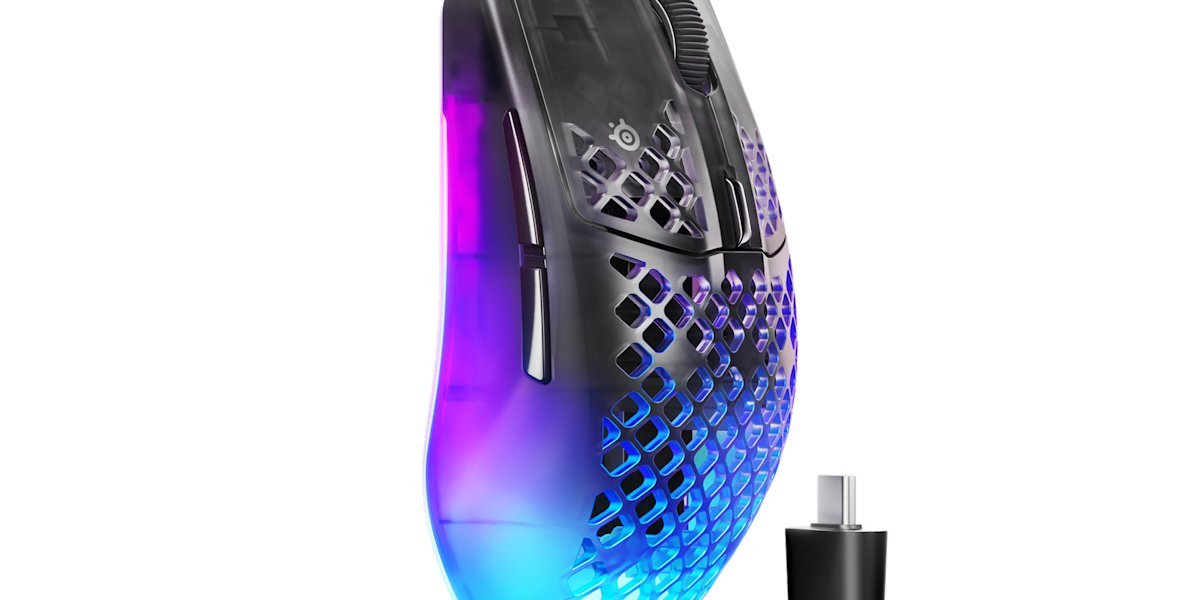
SteelSeries Aerox 3 Wireless Gen 2 — Best Value Wireless
The Gen 2 refresh takes the popular Aerox 3 and modernizes everything that matters: 4K (4000Hz) polling for lower latency, a TrueMove 26K sensor, and up to 200 hours of battery over Bluetooth. At 68g with an IP54 water-resistant shell and 3-zone RGB, it’s the most feature-packed wireless mouse in the mid-range tier — a genuine alternative to the premium flagships for much less money.
- Sensor: TrueMove 26K optical — up to 26,000 DPI, 650 IPS tracking
- Weight: 68g with honeycomb-style weight reduction
- Polling: 4KHz (4000Hz) wireless polling for ultra-low latency
- Battery: Up to 200 hours (Bluetooth) / ~120 hours (2.4GHz); USB-C fast charging
- Build: IP54 water and dust resistant; 80-million-click switches; 100% PTFE feet; 3-zone RGB
Pros: 4K polling at a mid-range price is exceptional value; huge battery life, especially over Bluetooth; IP54 rating survives sweaty sessions and spills; dual connectivity (2.4GHz + Bluetooth) for gaming and laptop use; RGB included where the flagships skip it.
Cons: The perforated shell divides opinion — dust collects in the holes and some dislike the feel; 68g is light but not Superlight-2 light; SteelSeries GG software is heavier than Logitech’s G Hub; side buttons are a bit mushy compared to the premium picks.
Check price: SteelSeries Aerox 3 Wireless Gen 2 on Amazon →

Glorious Model O Wireless — Best Ambidextrous Shape
The Model O Wireless helped start the ultralight revolution, and it remains a favorite for players who want a true ambidextrous shape. At 69g with a honeycomb shell, lag-free 2.4GHz wireless, and a comfortable medium-large footprint, it’s a proven performer — and Glorious’s ecosystem of grip tape, skates, and accessories is the best in the business for personalizing your mouse.
- Sensor: BAMF-class optical sensor — up to 19,000 DPI
- Weight: 69g honeycomb shell design
- Wireless: Lag-free 2.4GHz; up to 71-hour battery; USB-C charging
- Shape: Ambidextrous — suits left and right hands, claw and fingertip grips
- Extras: RGB lighting; PTFE feet; huge aftermarket accessory ecosystem
Pros: One of the few great ambidextrous wireless options — lefties welcome; the accessory ecosystem (grip tape, skates) is unmatched; comfortable for medium-large hands; proven shape with years of positive owner feedback; solid mid-range value.
Cons: The honeycomb holes aren’t for everyone — comfort and cleaning concerns; 71-hour battery trails the Aerox 3 and DeathAdder badly; sensor maxes out below the newest flagships (fine in practice, less impressive on paper); side buttons only on the left — not truly fully ambidextrous.
Check price: Glorious Model O Wireless on Amazon →
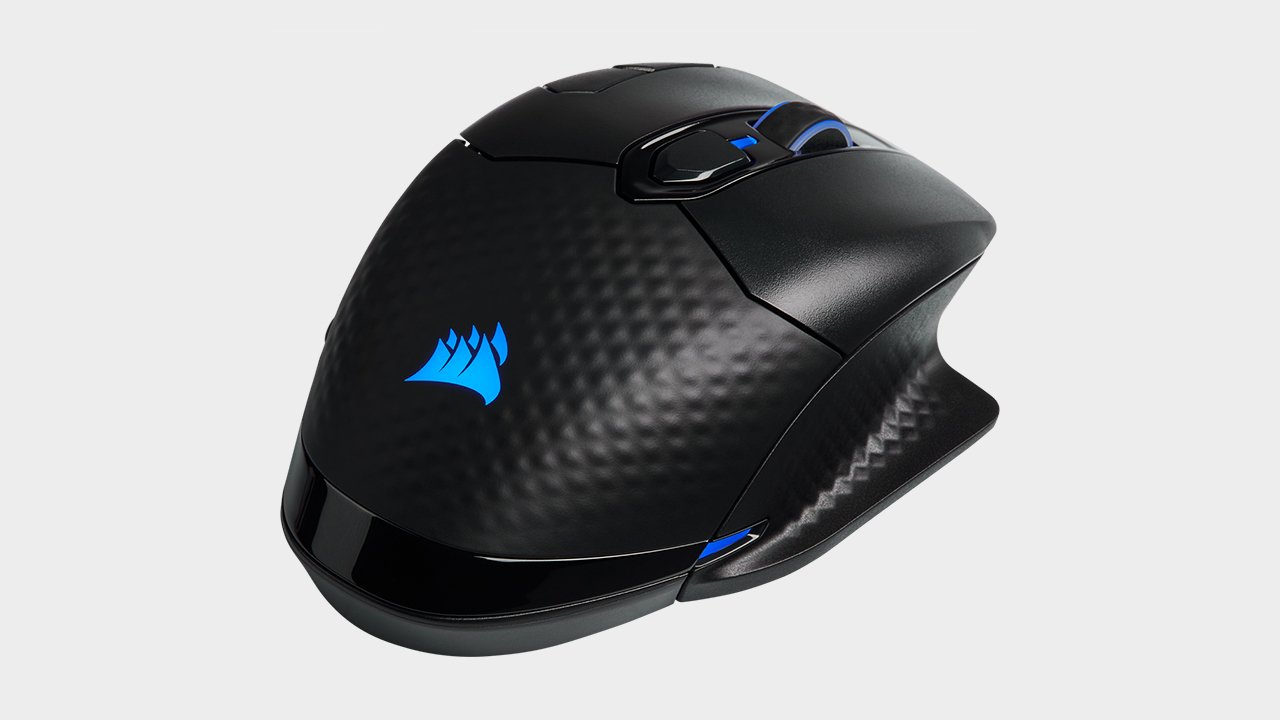
Corsair Dark Core RGB Pro — Best for MMO and Feature Lovers
If your games need more than five buttons — MMOs, MOBAs, complex macros — the Dark Core RGB Pro is built for you. Eight programmable buttons, three connection modes (SLIPSTREAM wireless, Bluetooth, wired), interchangeable side grips, and 9-zone RGB make it the Swiss Army knife of this roundup. It’s heavier than the esports mice, but that’s the trade for doing everything.
- Sensor: Custom 18,000 DPI optical sensor
- Buttons: 8 fully programmable buttons with macro support
- Connectivity: SLIPSTREAM sub-1ms wireless, Bluetooth, and wired — switch between three devices
- Battery: Up to 50 hours wireless; USB-C charging
- Comfort: Contoured shape with two interchangeable side grips; 9-zone dynamic RGB
Pros: The most buttons and connection options here — great for MMO/MOBA and productivity; interchangeable grips actually change the feel; iCUE software is powerful for macros and lighting; onboard profiles store settings; works across PC and couch setups via Bluetooth.
Cons: Around 133g — heavy for FPS flick shots; 50-hour battery is the shortest wireless figure here; iCUE software is resource-hungry and occasionally buggy; the contoured shape suits palm grip best; 18K sensor lags the newest flagships on paper.
Check price: Corsair Dark Core RGB Pro on Amazon →
How to Choose the Best Gaming Mice
Shape beats specs — always. The “best” sensor in the world won’t help if the mouse cramps your hand. Palm grippers generally want larger, ergonomic shapes (DeathAdder, Dark Core); claw grippers suit medium ambidextrous mice (Superlight 2, Model O); fingertip grippers want small and light. If possible, handle a mouse before buying — or buy from a retailer with easy returns.
Weight is the new DPI. The competitive meta has settled: lighter is faster for FPS. Sub-70g mice (Superlight 2, DeathAdder V3 Pro, Aerox 3) dominate esports for a reason — less mass means quicker stops and less fatigue. But weight is personal: some players aim better with a heavier mouse, and MMO players need the buttons more than the grams.
Don’t overthink the sensor anymore. Every mouse here has a flawless modern sensor — no acceleration, no smoothing, no spin-outs at sane DPI settings. Differences between 25K and 44K max DPI are marketing, not performance. Pick by shape, weight, and features instead.
Wireless is solved — but check the details. Modern 2.4GHz gaming wireless (LIGHTSPEED, HyperSpeed, SLIPSTREAM) matches wired latency in practice. What actually differs: battery life (50 to 200 hours here), whether Bluetooth is included for laptop/phone use, and polling rate (4K/8K polling helps marginally on high-refresh monitors).
Count the buttons you actually use. FPS players need 5–6; MMO and MOBA players want 8–12; productivity users love extra buttons for macros and shortcuts. More buttons add weight and complexity — the G502’s 11 buttons are perfect for some and clutter for others.
Consider the software. You’ll live in Logitech G Hub, Razer Synapse, SteelSeries GG, Glorious Core, or Corsair iCUE to configure DPI, buttons, and lighting. They’re all functional; none are beloved. If you hate background software, favor mice with onboard memory (G502, Dark Core) so you can configure once and uninstall.
Who Should Buy Which Mouse?
Buy the Logitech G Pro X Superlight 2 if you:
- Play competitive FPS and want the proven pro-stage standard
- Use claw or fingertip grip with medium-sized hands
- Want maximum performance with minimum fuss — no RGB, no bloat
Buy the Razer DeathAdder V3 Pro if you:
- Palm grip, or have larger hands that find ambi mice cramped
- Play long sessions where comfort matters as much as speed
- Want the longest battery life in a flagship esports mouse
Buy the Logitech G502 HERO if you:
- Play MMOs, MOBAs, or do creative work that eats macros
- Want the most features per dollar — nothing else is close at this price
- Don’t mind a cable, or actually prefer zero-latency wired
Skip the ultralights if you: mainly play strategy games, MMOs, or do office work — a heavier multi-button mouse serves you better. And if you’re building a full setup, check our best gaming laptops and best headphones roundups to complete your battlestation.
Frequently Asked Questions About Gaming Mice
Is wireless as good as wired for gaming now?
Yes, for all practical purposes. Modern gaming wireless (Logitech LIGHTSPEED, Razer HyperSpeed, Corsair SLIPSTREAM) delivers sub-millisecond latency that matches wired in blind tests. The real trade-offs of wireless are battery anxiety and price — not performance.
What DPI should I use for FPS games?
Most competitive players use 400–1600 DPI with adjusted in-game sensitivity, which translates to roughly 20–50cm of mouse movement per 360° turn. Higher DPI isn’t better — it just changes the math. Pick a comfortable cm/360 and stick with it; consistency beats any number.
What is polling rate and does 8000Hz matter?
Polling rate is how often the mouse reports its position — 1000Hz means every 1ms, 8000Hz every 0.125ms. On high-refresh-rate monitors (240Hz+), higher polling feels slightly smoother. The difference is subtle; shape and weight matter far more than 1000Hz vs 8000Hz.
How important is mouse weight?
Very, for fast-paced shooters — lighter mice stop faster and fatigue your wrist less over long sessions. That’s why esports has converged on 55–70g. But it’s personal: some players control aim better with 90g+, and button-heavy mice are inherently heavier. Don’t chase grams at the expense of comfort.
Do I need a special mousepad?
A decent large pad helps more than most upgrades — it gives you room for low-sensitivity aiming and consistent glide. Hard vs cloth is preference: cloth for control, hard for speed. Whatever you choose, keep it clean; a dirty pad ruins glide faster than any sensor difference.
How long do gaming mouse switches last?
Manufacturers rate switches from 50 to 90 million clicks — years of heavy use. In practice, the common failure is double-clicking on older mechanical switches; optical switches (Razer Gen-3, Logitech LIGHTFORCE hybrids) largely solve this. If your mouse double-clicks out of warranty, it’s usually a switch issue, not a sensor one.
Final Verdict: Best Gaming Mice
The Logitech G Pro X Superlight 2 is our pick for most gamers: 60 grams, a flawless HERO 2 sensor, and the shape that won over the pro scene. It’s expensive for what looks like a simple mouse — but that simplicity is the point. After comparing all the options, this remains our top recommendation for the best gaming mice.
Comfort-first players should take the Razer DeathAdder V3 Pro, button-hungry buyers the Logitech G502 HERO, and value-conscious wireless shoppers the SteelSeries Aerox 3 Wireless Gen 2. Match the mouse to your grip and your games, and you can’t go far wrong with any of these six.
As an Amazon Associate we earn from qualifying purchases. Prices and availability change frequently — see Amazon for the latest.
How we researched: We compared specifications from current Amazon listings (verified October 2026), aggregated common pros and cons from verified-purchase reviews and gaming communities, and scored the factors that matter most in a gaming mouse: shape and ergonomics, weight, sensor quality, switch feel, battery life, and software. Brand claims about latency, battery life, and click ratings are the manufacturers’ own figures and were not independently tested by us. We did not receive free products from any brand. Last updated: October 13, 2026.
Manufacturer resources for gaming mice: Logitech, Razer, Corsair.

Pingback: Best Gaming Laptops (2026) - Products Buy Reviews
Pingback: Best Monitor Mounts for Desk Setup (2026) - Products Buy Reviews
Pingback: Best iPad Stylus Pens 2026: Apple Pencil & Alternatives
Pingback: Kids Electric Dirt Bike: Complete Review & Guide (2026)