

⭐ Our Pick: HUANUO Single Monitor Mount (13–32″) — 4.5/5
Best for: Most desk setups — a gas-spring arm that holds 13–32″ monitors with smooth one-hand height adjustment, full tilt/swivel/rotation, and both clamp and grommet mounting in the box.
Skip if: You run dual monitors (get the MOUNTUP), you own a heavy 34″+ ultrawide (check weight limits carefully), or your desk has a glass top or a modesty panel that blocks clamping.
As an Amazon Associate we earn from qualifying purchases. How we research.
Best Monitor Mounts for Desk Setup (2026)
Your monitor’s factory stand eats a shocking amount of desk space — and locks your screen at whatever height the manufacturer guessed. A monitor arm fixes both: it floats the screen at true eye level, frees the desk underneath for a keyboard, notebook, or just breathing room, and lets you swing the monitor toward a colleague or into portrait mode in seconds.
We compared 5 leading monitor mounts — single gas-spring arms, a classic budget arm, a premium sit-stand arm, and a dual-monitor mount — on weight capacity, screen-size range, adjustment smoothness, mounting options, and what verified owners say after months of daily repositioning. Specs were verified against current Amazon listings (October 2026).
The short answer: the HUANUO single monitor mount wins for most people — gas-spring smoothness, 13–32″ support, and both mounting styles at a budget-friendly price. The NB North Bayou F80 is the long-running budget classic with a massive owner base. Power users with heavy or ultrawide screens should look at the Ergotron LX, and dual-screen setups belong on the MOUNTUP dual mount.
As an Amazon Associate we earn from qualifying purchases.
Quick Comparison of the Best Monitor Mount
| Product | Best for | Key spec | Price tier | Our rating |
|---|---|---|---|---|
| HUANUO Single Arm | Most setups | 13–32″, 4.4–19.8 lbs, gas spring | Budget | 4.5/5 |
| NB North Bayou F80 | Budget classic | 17–30″, 4.4–19.8 lbs, gas spring | Budget | 4.5/5 |
| VIVO STAND-V001 | Simple & sturdy | 13–32″ (38″ ultrawide), up to 22 lbs, pole mount | Budget | 4/5 |
| Ergotron LX Sit-Stand | Premium / heavy screens | Up to 42″, 7–25 lbs, 10-year warranty | Premium | 4.5/5 |
| MOUNTUP Dual Mount | Two monitors | 2× up to 32″, 17.6 lbs each, full motion | Mid-range | 4/5 |
Prices change frequently — click through to see the current price.
Detailed Monitor Mount Reviews

HUANUO Single Monitor Mount — Our Top Pick
HUANUO’s gas-spring arm is the sweet spot of the category: it holds 13–32″ monitors (4.4–19.8 lbs), adjusts height with a light one-hand push, and offers the full ergonomic range — tilt, ±90° swivel, and 360° rotation for portrait mode. Both a C-clamp and a grommet mount come in the box, and the brand rates the arm for 20,000 motion cycles. For a typical 24–32″ office or gaming monitor, this is all the arm most people need.
- Compatibility: 13–32″ screens, 4.4–19.8 lbs, VESA 75×75 / 100×100
- Adjustment: Gas spring; tilt −50° to +85°, ±90° swivel, 360° rotation
- Mounting: C-clamp (desks ~0.59–3.54″) and grommet mount included
- Extras: Integrated cable management; tension adjustable to monitor weight
- Durability: 20,000 motion-cycle rating (brand claim)
Pros: Gas-spring height adjustment is genuinely smooth — the main upgrade over cheap pole mounts; both mounting options included, no extra purchase; wide tilt and swivel range for shared desks; cable clips keep things tidy; strong value for the price.
Cons: 19.8 lb limit rules out heavy 34″+ ultrawides — weigh your monitor first; gas spring needs tension tuning for very light or heavy screens; the clamp needs a solid wood desk (glass tops and thin IKEA tops can be a problem); instructions are functional but not luxurious.

NB North Bayou F80 — Best Budget Classic
The F80 is the monitor arm that thousands of desk-setup photos have in common. It’s a gas-spring arm for 17–30″ monitors up to 19.8 lbs, with the same core ergonomics as pricier arms — +85° to −30° tilt, 180° swivel, 360° rotation — and an enormous owner base that has stress-tested it for years. If you want the safe, proven, cheap choice, this is it.
- Compatibility: 17–30″ screens (larger if under 19.8 lbs), VESA 75×75 / 100×100
- Adjustment: Gas spring; tilt +85° to −30°, ±90° swivel, 360° rotation
- Mounting: C-clamp and grommet mount included; detachable VESA plate
- Extras: Cable management clips; concealed hardware
- Track record: One of the best-selling monitor arms on Amazon for years
Pros: Proven reliability across a huge owner base; gas-spring smoothness at a budget price; detachable VESA plate makes mounting the monitor easy; compact folding design reclaims desk space; hard to beat on value.
Cons: 17″ minimum is limiting if you have a small secondary monitor; same 19.8 lb ceiling as the HUANUO; the gas spring can drift with monitors near the weight limits until tension is dialed in; finish and cable management feel basic next to premium arms.
VIVO STAND-V001 — Best Simple & Sturdy Pick
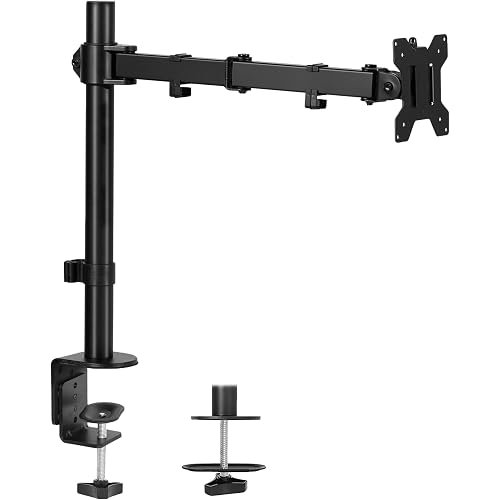
The STAND-V001 takes a different approach: instead of a gas spring, it uses an articulating arm on a center pole — you set the height once with the pole and adjust angle with the arm joints. It supports 13–32″ regular screens (up to 38″ ultrawides) at up to 22 lbs, slightly more than the gas-spring picks. If you set your monitor height once and never touch it again, this simpler mechanism is rock solid.
- Compatibility: 13–32″ screens (ultrawides to 38″), up to 22 lbs, VESA 75×75 / 100×100
- Adjustment: Articulating arm + pole; tilt ±90°, 360° swivel, 360° rotation; 16″ pole height range
- Mounting: Heavy-duty C-clamp (desks to 3.25″) + grommet mount included
- Extras: Detachable cable clips; toolless clamp installation
- Design: Aluminum and steel construction
Pros: Higher weight capacity (22 lbs) than the gas-spring budget arms; pole design is extremely stable — zero drift once tightened; supports ultrawides up to 38″; simple mechanism with less to wear out; very affordable.
Cons: Height changes require loosening the pole — not a one-hand daily adjustment like gas springs; bulkier pole takes more desk depth; joint tension needs periodic re-tightening on some units; less elegant than gas-spring arms for frequent repositioning.

Ergotron LX Sit-Stand — Best Premium / Heavy-Screen Pick
Ergotron is the professional standard for monitor arms — the brand offices and hospitals buy. The LX sit-stand arm handles screens up to 42″ and 7–25 lbs with 20 inches of lift (enough to work standing), folds nearly flat against the desk when not needed, and backs it all with a 10-year warranty. If your monitor is heavy, your desk is shared, or you just want the last arm you’ll buy, this is it.
- Compatibility: Monitors to 42″, 7–25 lbs, VESA 75×75 / 100×100 (adapters for larger)
- Adjustment: 20″ lift range; 360° rotation; 75° tilt; extension arm included
- Mounting: Two-piece desk clamp (0.8–2.5″) + grommet mount included
- Extras: Integrated cable management; anchor holes for security
- Warranty: 10-year manufacturer warranty
Pros: Handles heavy and large monitors the budget arms can’t; 20″ lift works for sit-stand desks; the 10-year warranty is unmatched in this roundup; buttery, precise movement that stays put; professional build quality throughout.
Cons: Premium price — several times the budget picks; 7 lb minimum means very light monitors may float upward; overkill for a basic 24″ office monitor; the polished aluminum look isn’t for everyone; installation takes longer than simpler arms.

MOUNTUP Dual Monitor Mount — Best for Two Monitors
Two monitors on factory stands eat your entire desk. The MOUNTUP dual mount puts both on independently adjustable gas-spring arms — each supporting up to 32″ and 17.6 lbs — so you can angle, tilt, and rotate each screen separately. It’s the pick for developers, traders, editors, and anyone living in a multi-window workflow.
- Compatibility: 2× monitors to 32″, 4.4–17.6 lbs each, VESA 75×75 / 100×100
- Adjustment: Independent gas-spring arms; tilt, 180° swivel, 360° rotation per screen
- Mounting: C-clamp and grommet base included
- Extras: Cable management; 3-year support (brand claim)
- Design: Single base, dual arms — cleaner than two separate mounts
Pros: Each monitor adjusts independently — angle one toward you, rotate the other to portrait; one base instead of two clamps saves desk edge space; gas springs make repositioning easy; good value versus buying two single arms.
Cons: 17.6 lb per-arm limit is lower than single-arm picks — check both monitors’ weights; two 32″ monitors need a wide desk; setup and leveling two screens takes patience; not ideal if your monitors are very different sizes.
How to Choose a Monitor Mount
Weigh your monitor — don’t guess. Every arm has a weight range, and it’s the spec that matters most. A 34″ ultrawide can easily exceed 19.8 lbs, which rules out both budget gas-spring picks here. Check your monitor’s spec sheet (without its stand) and buy an arm whose range comfortably includes it — ideally in the middle, not at the edge.
Gas spring vs. pole mount. Gas-spring arms (HUANUO, NB F80, MOUNTUP, Ergotron) let you push the monitor up and down with one hand — great if you adjust height daily or share a desk. Pole mounts (VIVO) are set-and-forget: rock solid, but height changes need tools. Pick based on how often you’ll move it.
Check your desk before you buy. C-clamps need a solid edge 0.4–3.5″ thick with clearance underneath — glass tops, thin particle-board desks, and desks with modesty panels or crossbars can all be dealbreakers. Grommet mounting needs a hole (or willingness to drill one). When in doubt, measure twice.
VESA compatibility is usually fine — usually. All five mounts here support the standard 75×75mm and 100×100mm VESA patterns found on most monitors. The exceptions: some curved ultrawides and a few slim monitors need adapters (Ergotron sells them), and a handful of monitors have no VESA holes at all — check the back of your screen.
Single vs. dual. If you run two monitors, a purpose-built dual mount (MOUNTUP) is cleaner and cheaper than two single arms — but only if both monitors fit its per-arm weight limit. Mismatched sizes work, though leveling takes patience.
Don’t forget ergonomics. The point of the arm is eye-level viewing: the top of your screen at or slightly below eye level, about an arm’s length away. Set the height once properly and your neck will thank you — that’s the real upgrade, whatever arm you buy.
Who Should Buy (and Who Should Skip) a Monitor Arm
Buy a monitor arm if you:
- Want your screen at true eye level instead of whatever height the factory stand gives
- Need desk space back — an arm frees the entire footprint of a monitor stand
- Share a desk, rotate to portrait for coding/docs, or swing the screen toward clients
Skip it (or choose carefully) if you:
- Have a glass-top desk or a desk edge that can’t take a clamp — verify mounting first
- Own a very heavy ultrawide — only the Ergotron LX here is rated for 25 lbs
- Never move your monitor and have plenty of desk space — a simple riser stand is cheaper
Build the full setup: pair your arm with a gaming laptop as a second machine, a precision gaming mouse for long sessions, and proper room lighting to cut evening eye strain.
Frequently Asked Questions About Monitor Mount
Will a monitor arm fit my monitor?
Check two things: the VESA pattern on the back of your monitor (75×75mm or 100×100mm covers most models — all five arms here support both) and your monitor’s weight without its stand. Stay comfortably inside the arm’s weight range, not at its limit.
Can I mount a curved ultrawide monitor?
Yes, if the weight fits — the VIVO STAND-V001 supports ultrawides to 38″ (22 lbs) and the Ergotron LX handles up to 42″ (25 lbs). Note that some ultrawides use recessed or non-standard VESA mounts needing an adapter, so verify on the product page for your exact model.
Will the clamp damage my desk?
On solid wood desks, no — the clamp distributes pressure and most include padding. Be cautious with glass tops (many manufacturers advise against clamping) and thin hollow-core desks, which can dent or crack. If unsure, a grommet mount or freestanding base is safer.
Gas spring or pole mount — which is better?
Gas spring if you adjust height often or share the desk — one-hand movement is the whole point. Pole mount if you set it once and forget it — simpler, cheaper, and zero drift. Neither is “better” in absolute terms; match it to your habits.
Can I mount two monitors on one arm?
Yes — that’s what the MOUNTUP dual mount is for, with two independently adjustable arms on one base. Just confirm both monitors are within the 17.6 lb per-arm limit and that your desk is wide enough for your combined screen width.
How high should my monitor be?
The ergonomic standard: top of the screen at or slightly below eye level, screen about an arm’s length (20–28 inches) away, with a slight upward tilt. If you wear bifocals, drop it a touch lower. Set it once with your arm’s height adjustment and leave it.
Final Verdict: Best Monitor Mount
The HUANUO single monitor mount is our pick for most desks — smooth gas-spring adjustment, full ergonomic range, both mounting styles included, and a price that makes the upgrade a no-brainer. The NB North Bayou F80 is the equally proven budget alternative with years of owner history behind it.
Heavy or ultrawide screens belong on the Ergotron LX, set-and-forget users will love the rock-solid VIVO STAND-V001, and dual-screen workflows get the MOUNTUP dual mount.
As an Amazon Associate we earn from qualifying purchases. Prices and availability change frequently — see Amazon for the latest.
How we researched: We compared specifications from current Amazon listings (verified October 2026) and manufacturer pages including Ergotron, and aggregated pros and cons from verified-purchase reviews. Weight and size ratings are the manufacturers’ specifications. We did not receive free products from any brand. Last updated: October 13, 2026.

Pingback: Best Gaming Laptops (2026) - Products Buy Reviews
Pingback: Best Electric Air Dusters for PC Cleaning (2026)